
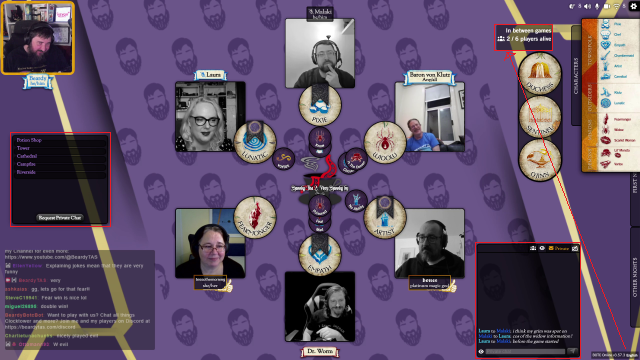
When you spend as much time consuming Blood on the Clocktower as I do, you start noticing all the little things that bother you about the layout and presentation. It’s that viewer to creator mindset that has taught me a few things of how I present my stream and games to hopefully smooth this friction for the viewers.
Layout
This is how I set the Blood on the Clocktower Official App (botc.app) up for the viewing experience. My goal is to have all necessary information easily viewable by a viewer who joins at any time to, as best and quickly as they can, catch up with the game state to get maximum enjoyment. To this end, I have, always visible, the text and voice chat boxes, as well as the bluff and NPC tabs, in places that make sense. Once I have these positioned I turn off the ‘Allow Side Tabs Moving’ option so that I firstly don’t accidentally move or collapse them, but also such that the menus are hidden for a cleaner look. This is achieved via the below CSS.

#tab-chat
{
    left:50px !important;
    top:550px !important;
    position:fixed !important;
    width:400px !important;
    height:350px !important;
}

#tab-text
{
    left:1915px !important;
    top:975px !important;
    position:fixed !important;
    width:400px !important;
    height:450px !important;
}

#tab-npcs
{
    left:2000px !important;
    top:200px !important;
    position:fixed !important;
    width:200px !important;
    height:750px !important;
}

#tab-bluffs
{
    left:15px !important;
    top:350px !important;
    position:fixed !important;
    width:512px !important;
    height:149px !important;
}
Next, I keep the standard script open at the side, with the second smallest zoom level which allows all characters on standard (13-4-4-4) scripts visible with room for extras on some custom scripts, both when only showing the characters but also fully open to see the full abilities.
Finally, WHAT DAY IS IT?!? This is a personal pet-peeve of mine when joining (especially Leviathan) mid-game and these details are hidden in the bottom right by scripts or cameras. To fix this I have moved the day and player counter up and enlarged it, while keeping the less relevant version and language in the normal place.
.version
{
    font-size: 60%;
    background-color: rgba(0, 0, 0, 0.5);
    bottom: 5px;
    opacity: 1;
    padding: 5px;
    position: fixed;
    right:5px !important;
}

#version
{
    top:100px;
    right:350px !important;
    font-size:100% !important;
    height: 100px;
}
Players
They are the lifeblood of any Clocktower stream, and shining a spotlight on them each week is something that is important to me, as streams live or die based on their players. I introduce them at the start of every hour as well as doing a Twitch shout-out for people to follow them. We also have a Players Page, which highlights the regular players (as well some special guests), including their favourite dad joke, best videos and external links to their own amazing projects!
ambiance
This comes in two parts, visual and audio. Visually, consistency week to week means that, without conscious thought, viewers recognise that this is, indeed and unmistakably, Beardy content. The background was also designed to be easy on the eyes with vibrant, but not bright colours as the central theme and some tiling to help focusing.
Next is the music choice, both the song and the volume. It was chosen to have no lyrics to distract from the game, but also not be flat and monotonous. It has a playful vibe that matches the style of content I produce. The level at which the music is played is also important, as it needs to be quiet such that it never interferes with the players but also loud enough to be heard without straining during quiet moments.
Extras
There are a few extra things I also want to touch on that I have implemented. The first is how to keep viewers between games. I have experimented with this and my current starting/between/ending screens are some of my shorts being played. This has really helped with viewer dropoff between games and they are engaged watching these.
Next is the BOTC Script overlay, which is a interactive script display (made by the amazing German community) so this helps viewers get the script details, including the Fabled, NPC and Bootlegger information at their own convenience.
Following on from the idea that the players matter the ose, I have also adjusted the ‘Player Avatar Size’ up to 130% and ‘Player Token Size’ down to 70%, to really emphasise the focus on the player.

I have also added back the greyscale for dead players back, mostly as a personal preference.
.player-avatar.dead
{
filter: grayscale()
}
To round this out, I have my own custom Twitch Bot. This provides all the tool, such as character lookups, expected from a BoTC bot, with also the ability for me to add homebrew characters and all the other important commands that might be needed, either as the streamer to streamline running or as a viewer to enhance their experience. I implemented this using Streamer.bot which is highly customisable and has allowed me to help other streamers implement this (Shout-out to Rebecca and Angelo at CoastToCoast!)
Thank you for coming to my TED Talk blog post.
Leave a Reply